

Introduction
If you travel for work, split time between home, hotel rooms, coworking spaces, and client sites, you already know how frustrating it is to keep plugging and unplugging everything. A good docking station can turn a laptop into a real workstation in seconds, and that is exactly where the RayCue 15-in-1 Laptop Docking Station stands out. It is designed for people who want a compact hub that can handle multiple monitors, fast data transfers, wired internet, and laptop charging all at once.

For the travel accessories niche, this dock is especially interesting because it helps create a portable, repeatable setup wherever you land. Instead of carrying a pile of adapters, you get one central hub with broad compatibility for Windows laptops from Dell, Lenovo, HP, and others. If you want to see the current details and availability, check it here.
Key Features

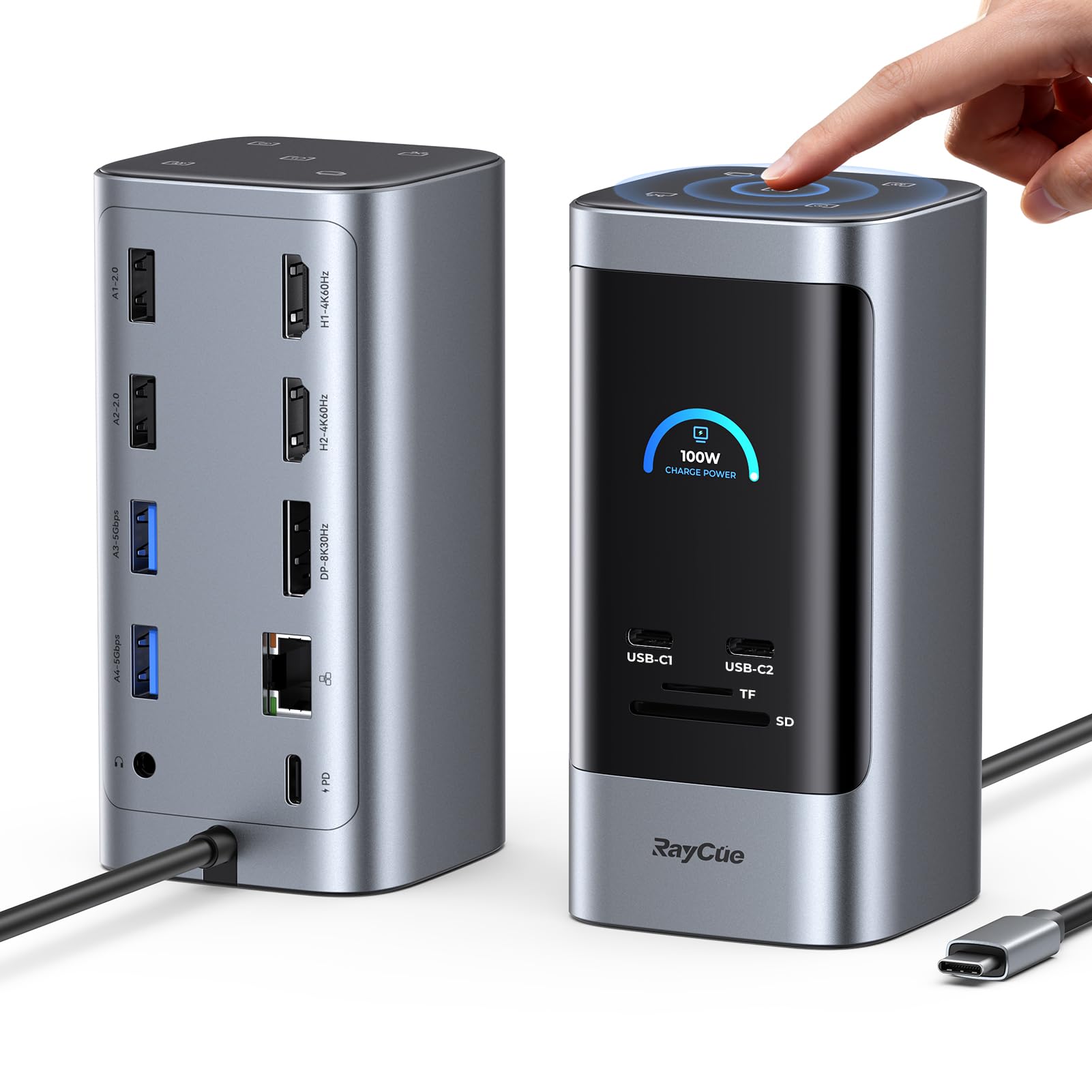
- 15-in-1 expansion with 2 HDMI ports, a DisplayPort, USB-C data ports, USB-A ports, an SD/TF card reader, Ethernet, AUX, PD input, and shortcut buttons.
- Triple-display support for Windows systems, with up to 8K@30Hz and 4K@60Hz output through HDMI and DisplayPort connections.
- Smart LED status screen that shows real-time information such as charging power and resolution.
- Five shortcut buttons for screen capture, UI switching, display mode toggling, computer lock, and brightness adjustment.
- USB 3.2 Gen 2 support with up to 10Gbps transfer speeds for fast file movement.
- 100W USB-C PD input with pass-through charging support up to 85W to the laptop.
- Gigabit Ethernet for a more stable wired internet connection.
- Compact vertical aluminium design with a 1m cable for a cleaner desk setup.
In-depth review
Performance
The biggest reason to consider the RayCue dock is performance, and in everyday use it delivers the kind of flexibility frequent travellers need. If you often arrive at a hotel or temporary workspace and want to connect a laptop to multiple monitors, keyboard, mouse, storage devices, and ethernet without fuss, this dock is built for that kind of workflow. The triple-display support is the headline feature for Windows users, and that alone makes it appealing to professionals who want more screen space for spreadsheets, design work, research, or multitasking between communication apps and documents.

Real-world use should be approached with the right expectations, though. The dock is clearly strongest in a Windows environment, where it can extend across multiple displays. MacOS users need to be aware of the limitation: Triple-display mode is not supported in the same way, so if you are a Mac traveller, this may not be the best fit unless you only need a simpler display setup. For Windows users, the mix of HDMI and DisplayPort outputs gives helpful flexibility when connecting to different monitors in offices, conference rooms, or hotel desks.
Data transfer is another area where the dock shines. The inclusion of USB 3.2 Gen 2 ports with up to 10Gbps speeds means large files move quickly, which is useful if you are backing up photos, transferring project folders, or moving media between devices while on the road. The SD/TF card reader is also a practical bonus for photographers, content creators, and anyone who still relies on memory cards during travel.
Build quality
The RayCue dock has a compact vertical design with an aluminium finish, and that gives it a more premium feel than many bulky plastic hubs. For travel and temporary setups, the smaller footprint is a plus because it keeps your desk cleaner and takes up less room in a backpack or laptop bag. The 1m cable is a thoughtful inclusion as well, since it gives you some flexibility in how you position the dock near your laptop and monitors.
The smart LED status screen adds a modern touch and is more useful than it may sound at first. Being able to quickly see charging power or display status can help reduce guesswork when you are setting up in unfamiliar spaces. The physical shortcut buttons also contribute to the overall sense that this is a productivity-first product rather than a basic port splitter. They make the dock feel more intentional and easier to use in a fast-moving work environment.
One note worth mentioning is that the dock ships without a power adapter, so you will need to supply your own compatible charger. That is not unusual for this category, but it is something travellers should plan for, especially if they want to use the dock at full capacity. The dock also works best when paired with the right power input, so keeping a quality charger in your travel kit is important.
Ease of use
For most users, setup should be straightforward. The value of a docking station like this is that it reduces the number of individual connections you have to manage. Plug in the dock, connect your monitors, and attach your peripherals, and you are ready to work. That simplicity matters a lot when you are moving between locations and do not want to troubleshoot a mess of cables every time.
The shortcut buttons are a standout convenience feature because they help streamline repetitive tasks. Screen capture, switching UI modes, toggling display modes, locking the computer, and adjusting brightness are all actions that can be useful in a travel work setup. Instead of digging through menus, you can handle common tasks with a tap. That makes the dock feel more like a productivity tool than just an expansion hub.
Still, there is a learning curve with any advanced dock. If you are only used to simple USB hubs, the number of ports and display options may feel a little overwhelming at first. Once everything is configured, though, the dock is designed to stay out of your way and let you work. For people who frequently set up and pack down their gear, that kind of reliability is a real advantage.
Value for money
In terms of value, the RayCue 15 in 1 Docking Station is a strong option for users who genuinely need its feature set. You are getting broad connectivity, fast data transfer, wired networking, charging support, and multi-monitor capability in one device. If you compare that to buying several separate adapters and hubs, the overall package becomes much more attractive.
That said, the best value comes from using it in the right scenario. If you only need one external display and a couple of USB ports, this may be more dock than you need. But if your travel setup demands multiple screens and a cleaner, more professional workspace, the added convenience can easily justify choosing a more capable dock like this. For buyers who want to check current availability and see whether it fits their setup, view it on Amazon.
How it compares to alternatives
Compared with simpler travel hubs, the RayCue is much more ambitious. Basic USB-C adapters may be lighter and cheaper-looking in design, but they usually cannot match the combination of triple-display support, Ethernet, card reading, and charging passthrough. On the other hand, some premium docks from well-known brands may offer broader Mac compatibility or a more polished ecosystem, but they can also be less flexible or less feature-dense in this class.
The RayCue’s biggest advantage is that it packs a lot into a compact form without feeling stripped down. Its biggest tradeoff is compatibility: Windows users get the most out of it, while Mac users need to be careful about the display limitations. If your travel routine is built around a Windows laptop, this dock compares very favourably to many alternatives because it gives you a near-desktop experience wherever you go.
Overall, the RayCue 15 in 1 Docking Station feels like a practical, productivity-focused choice for travellers who want a serious workstation upgrade. It is not just about adding ports; it is about making your mobile setup faster, cleaner, and easier to use.
Pros and cons
- Excellent port variety for a travel workstation
- Strong triple-monitor support for Windows users
- Useful smart LED status screen
- Handy shortcut buttons for faster workflow
- Fast data transfer and wired Ethernet support
- MacOS users have limited display support
- A power adapter is not included
- Best results depend on having the right compatible setup
Who is it for?
This dock is best for remote workers, business travellers, digital nomads, and content creators who use a Windows laptop and want a more complete desk setup on the go. It is especially useful if you regularly connect to multiple monitors, move large files, or need a reliable wired internet connection in temporary workspaces.

It is also a smart pick for people who want to reduce cable clutter and keep their travel gear organised. If you value convenience, fast switching, and a more professional setup, the RayCue dock is worth a look. If you want to check the latest details and order it, check current availability and price here.
Final verdict
The RayCue 15 in 1 Laptop Docking Station earns a strong recommendation for Windows users who need a travel-friendly hub with serious expansion. Its combination of triple-display support, fast data transfer, Ethernet, charging passthrough, and useful shortcut buttons makes it a versatile tool for work on the move. With a solid 4.40/5 rating from thousands of reviews, it clearly resonates with a lot of buyers.
If you want a compact dock that can help turn almost any temporary workspace into a productive one, this is a compelling option. Just be sure to account for the MacOS display limitation and the fact that you will need your own power adapter. For the right user, though, it offers excellent utility and a very practical travel setup upgrade. See current details here.
As an Amazon Associate we earn from qualifying purchases. Prices and availability are accurate as of the date/time indicated and are subject to change.